

We offer setup, configuration and ongoing administration services for your Google Workspace account.
AI-powered CRM that captures conversations, automates data entry and surfaces insights via chat.

Professional Email
GMAIL
Google Workspace offers professional email @yourdomain.com that is powered by Google Cloud and accessible through Gmail, Microsoft Outlook and other email clients (software)
File Storage
google drive
You can keep all their files in one secure place with 30Gb to unlimited file storage. Files are accessible from any location and on any device.
Communication
Chat • Meet • Calendar • Sites • groups
Teams can connect from anywhere in the world using Google Chat, Google Meet for video conferencing, Calendar and Google Sites to exhibit content from within the platform.
Collaboration
Docs • Sheets • Slides • Forms • Keep
Google Workspace Apps make it easy to create, share and collaborate on projects with word processing, spreadsheets, presentations, form building and notes applications.
Google Workspace Services
Set up
We'll handle creating and configuring your account, including domain and email setup.
Ongoing Support
We can manage your account, such as password resets, staff access updates, training and file restoration.*
*Required 3rd-party data recovery add-on
Protect your Google Workspace
Safely back up and recover your data
We will install and manage the most trusted solution available today for Google Workspace.

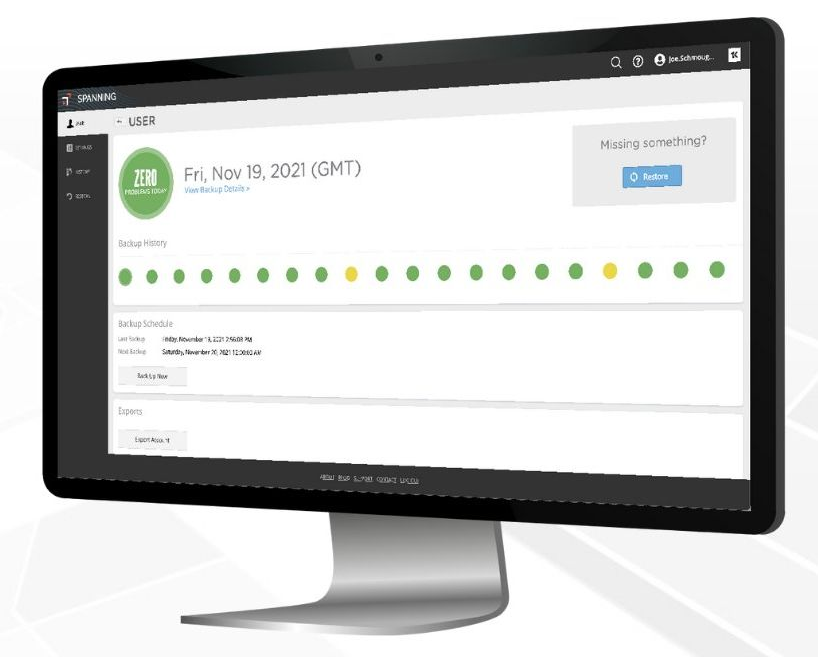
Spanning Backup features overview
Comprehensive protection
Back it all up: Gmail, Drive (including Team Drives), Calendars, Contacts, and Sites with no limits on storage or number of backups.
Automated
Runs in the background, providing daily, automated backup of G Suite data for users in your org.
On demand backup
Gives you the flexibility to also run a manual backup at any time for Gmail, Drive, Team Drives, Calendars, Contacts or Sites data for any user. There are no limits on how many on-demand backups you can run.
Status monitoring
Check the dashboard for the state of your most recent backups. Receive status notifications through daily, weekly or monthly emails.
Transparent reporting
Use the audit log for an immutable, detailed record of every action done by any user within the platform.
100% restore guarantee
Restore Google Workspace data backed up by Spanning accurately, or we’ll give you 10x the money back. Read on for details.
Point-in-time restore
Restore Drive and Team Drive content from any point-in-time backup, including sharing settings. An administrator can also restore the data to a different user.
Granular, search-based restore
Recover select files and emails by browsing, searching, or filtering based on your criteria. Then restore just what’s needed to get back to work.
Team drive restore
Restore your Team Drives data including folder structure and sharing settings.
Cross-user restore
Easily restore data from one user account into another to simplify employee on-boarding and off-boarding.
Backup
- Unlimited storage
- Unlimited versions
- Automated daily backups
- On-demand backups
- Gmail backup
- Drive backup
- Team Drives backup
- Calendars backup
- Contacts backup
- Sites backup
- Shared files backup
Restore
- 100% restore guarantee
- Point-in-time restore
- Search-based restore
- Label-base restore
- Granular email restore
- Granular folder and file restore
- Sharing settings restore
- Cross-user restore
- Whole account exports
- Piecemeal downloads
- End user self-service restore
Administration & Control
- Backup history dashboard
- Granular backup controls
- Error correction suggestions
- Status update emails
- Immutable audit log
- Email retention policies
- Named user access controls
- Individual license management
- Organizational license management

Google Workspace
Take the next step with
Google





Ask us how you can save when you bundle our web apps.